reza
About
- Username
- reza
- Location
- los angeles
- Joined
- Visits
- 2,429
- Last Active
- Roles
- Moderator, Beta Tester
- Points
- 35
- Location
- los angeles
- Website
- okreza.com
- Music Streaming Link (if applicable)
- soundcloud.com/okreza
- Posts
- 753
- 4
- Badges
-
Sub Bass
adding a attack to the amplitude envelope (env1) can help, as @LegsMechanical mentioned. however, a more simple way is to set the retrigger phase (shortcut is <3rd from left, 4 down>) to 00 instead of OFF. if you're using two oscillators, you should do that to both (however, in some cases, that may make some unintentional changes to the overall timbre of the synth patch depending on how you are interacting with those oscillators)
explanation:
the deluge will play waveforms with the phase always in motion when retrig phase is OFF. what that means is that the sine wave can be triggered at places where there is already amplitude information, it will play anywhere within the cycle of the sine shape. if it's above or below the zero-crossing, then you will hear a blip. same thing can happen when you have a sample that ends before the sound has faded out, in this case the blip would be at the end. -
Automation View Mode
Merged with Community Firmware!
This feature's implementation started with @seangoodvibes
Main GitHub Documentation │ GitHub Pull Request InfoAutomation View Mode
Automation Instrument Clip View is a new view that complements the existing Instrument Clip View (which is accessed by pressing the Clip Button). It allows you to edit automatable parameters on a per step basis at any zoom level.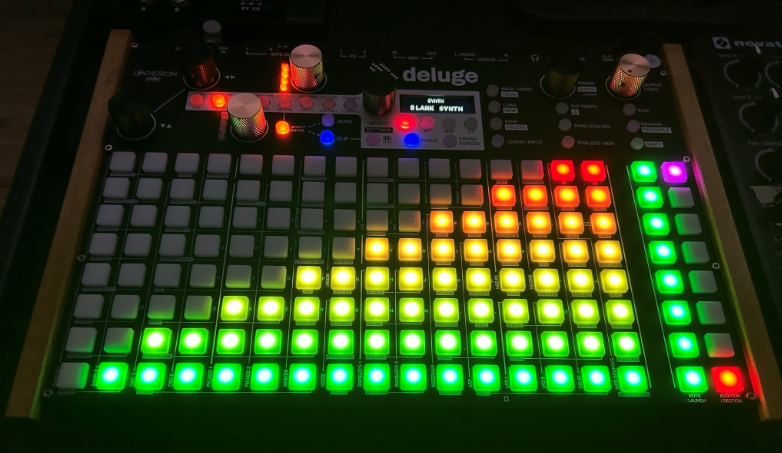
Discuss this feature, provide video/audio examples, etc.
-
Master Compressor
Merged with Community Firmware!
This feature's implementation started with @Alter
GitHub Documentation | Documentation 2Master Compressor
Allows a-per-project master compressor to be enabled and fine tuned.In Song view, select 'Affect Entire' and SIDECHAIN modulation button, and adjust the upper gold knob. Push the upper gold knob to switch to the next setting (Threshold (dB), Makeup Gain (dB), Attack (ms), Release (ms), Ratio, MIX). The LEDs next to the knob act as a gain reduction meter.
This compressor function can be turned on/off in the runtime feature setting.

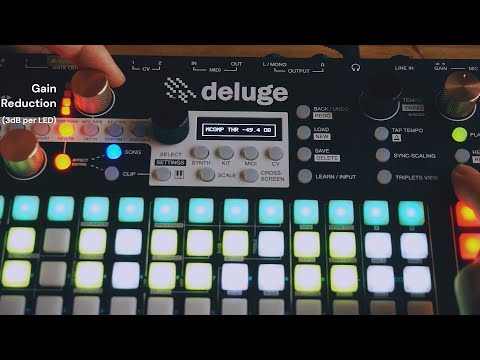 The button combinations and display in the video are different from the current implementation.
Discuss this feature, provide video/audio examples, etc.
-
How do I slide everything to the right so I can add notes at the beginning?
to slide notes you click and hold down the up/down encoder then turn the left/right encoder to slide, it can wrap around so if you slide counterclockwise it will start appear at the end of your clip.
you most likely have to increase the length of the clip so then you can make room for the verse ur saying you want to add. do that by holding shift+turning the left/right encoder clockwise (you can also click and turn counterclockwise on the same left/right encoder to zoom out so you can add larger amounts of bars faster.)
-
4.0.0 FIRMWARE OUT NOW!
@mcpepe said:
I also get the "Error" message when trying to upload. My only .bin file in the root fólder is the 4.0 firmware .bin file.
What can I do?any chance you're using mac or ipad? i think sometimes hidden .ds_store files can appear when accessing the sd card from those operating systems, if those files exist on the root maybe it causes problems? did u add any other folders to the root sd card?

-
change mode for all samples in a kit?
hold "affect all" when scrolling to a different mode, a few other things can work this way as well, such as polyphony.
-
Midi 1A
the reason is that you may use a polyphony synth for midi 1. what if you have a B part for your polyphonic synth, that would be a clip for midi 1A, then if you have a chorus part for polyphonic synth then it would be midi 1B. it''s just different iterations of the same midi instrument
-
Can multiple samples be "overloaded" into a single pad?
Too_Mere has two great suggestions for workarounds, but yeah the feature doesn't intentional exist on the Deluge the way you describe.
Another way I simulate this is by taking any one sample (ie. a closed hihat) and then setting certain values to be patched to random or by LFO or by both. I'll make the hihat's sustain 0 and lower the decay till it seems to actually shorten the sample length, then randomize the decay by about 5 to 15 so now some hihats will randomly close slightly earlier than others. I do the same with master level, randomizing even just by 5-10 makes the effect not too distinct, then with randomize pitch by a small value of 1 to 5ish. Even small random variations with noise, LPF, decimation, will do a lot to simulate this with the built in synth engine that all kit rows have access to, just have to be tasteful/creative with it based on the type of drum sound you are trying to simulate.
-
Sample line-in is mono
if the sample is in a clip, can you check if panning is set to 0?
otherwise, a couple questions:
what monitoring setting are you using on the deluge?
what cable is being used for the line in, what is plugged on computer/sound card?
are your headphones plugged into the deluge? -
Change track colour in Song View?
Here's a workaround to get monochromatic colors for clips in song view:
1) Enter clip
2) If synth, scroll to a very high note, if kit, make a new sample at the highest row.
3) Mute the high synth note row or sample row.
4) Place a note on the first beat of the sequence, hold the note for the entirety of the clip.
4b) For kit row samples, set the sample to stretch first, then extend the note for the entirety of the clip.
5) Exit clip view and see how the row in song view is lit only that highest note's color. Since they're muted they won't play or conflict with the sequence.1st pad will be brightest color, the rest will be same color slightly faded. If you wanted to have only bright colors, then you can enter notes at every step, but if you zoom in, there will be gaps!